Why Real-Time Solar Energy Monitoring Matters for Modern Solar Plants
Published by Sybel Micro Solutions
Published: 11 September 2026 · Updated: 11 September 2026
A solar plant can produce a plausible daily total while still leaving important operational questions unanswered. Was the data complete? Did every expected inverter report? Was a short interruption visible during the day, or only noticed after the reporting period closed? These questions explain why real-time monitoring matters alongside periodic production reporting.
Real-time solar energy monitoring is the review of incoming generation and equipment information in its time context. It gives operators a current starting point for investigation, while historical data helps explain how the situation developed. The benefit is not that a live number automatically reveals the cause of a problem. It is that the team can ask a more specific question while the relevant period is still fresh in people's working knowledge.
Why manual monitoring can leave gaps
Manual checks can be useful, particularly when performed by someone who understands the installation. Their limitation is coverage. A reading taken at one moment cannot describe the full shape of a day, and separate equipment interfaces can make it difficult to establish whether several observations concern the same interval.
A periodic spreadsheet may preserve totals without preserving the context needed to explain them. If a value looks unusual, the reviewer may need to reconstruct the equipment state, reporting coverage and operating conditions afterward. Centralized monitoring can provide another source of evidence for that discussion. It should complement local knowledge, not suggest that a person at the site has no role in interpretation.
Begin by checking whether the information is current
Freshness is the first question in a live review. A value that stopped updating may remain on screen and appear reasonable. Without a timestamp or availability context, it can be mistaken for a stable operating condition. This is particularly important when zero output could mean several different things.
The effective update interval depends on field collection, communication and the platform's processing arrangement. “Real time” should therefore be understood in relation to the deployment, not as a promise that every point is instantaneous. Agree on the expected interval and make it part of the operator's routine. The Real-Time Energy Monitoring solution describes this relationship between current values and reporting state.
Keep power and energy separate
Power describes a rate; energy describes an amount accumulated over a period. A strong current-power reading does not prove that the completed day's generation will be strong. Similarly, a daily energy total cannot show exactly when a brief change occurred. Both views can be useful if the reviewer understands which question each answers.
Start with the measurement boundary as well. Inverter output and a grid-side meter may represent different points in the installation. Their values should not be treated as interchangeable without understanding the electrical arrangement and any relevant calculations. Clear units and periods turn a dashboard from a visual display into evidence that can be discussed consistently.
Use inverter visibility to narrow an investigation
A site total can conceal differences between devices. If several inverters show similar behavior while one differs, the difference provides a reason to look more closely. It does not yet establish a fault. Equipment configuration, capacity, orientation and operating conditions may all affect a comparison.
A useful device review asks whether the source is reporting, what its available status means and how its measurements changed over the selected period. SEMS includes inverter generation comparisons, live readings and string-related views that support this kind of investigation. The Device and Inverter Monitoring page explains the scope and limitations of the inspected interface.
Treat alarm detection as the beginning of a response
An alarm record draws attention to a condition. It is not the same as a completed operational response. The team needs to know which equipment is affected, whether the information is current and who should review the event. Communication-related records are particularly useful when a change in data availability might otherwise be interpreted as a change in production.
Connect alarm information with the relevant interval in the generation or device view. If they coincide, record the relationship and decide what additional evidence is needed. Avoid assigning a cause simply because two events share a time period. The Alerts and Alarms solution describes how history and ticket state can support an agreed review process without implying a specific notification service.
Read the shape of generation, not just the total
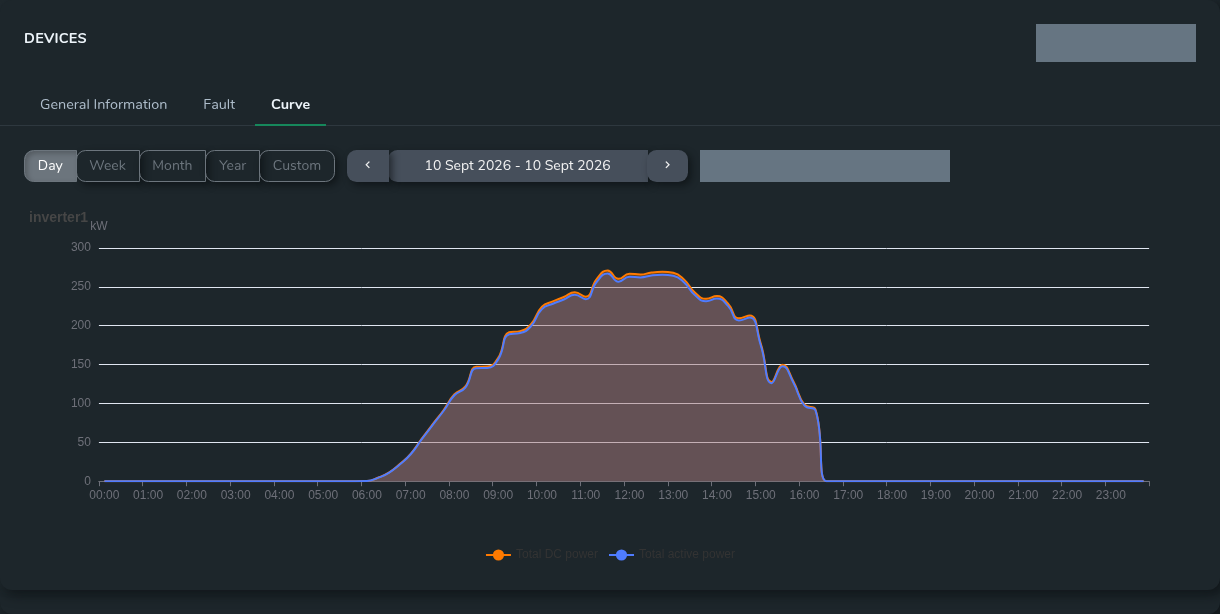
A curve can show information that a total hides: a gap, an unusual transition or a different pattern across part of the operating period. A daily view is often a useful place to begin this inspection. A longer range can then help establish whether the pattern was isolated or repeated.
The comparison must account for available data. A partial day, missing samples or different operating conditions can change the shape without proving underperformance. Identify the period, inspect its completeness and explain relevant differences before presenting a conclusion. In SEMS, the inspected device interface includes several time-range controls, allowing users to review the selected source from different temporal perspectives.
Compare performance with a suitable reference
The idea of expected performance needs a definition. A historical day, a configured target and an engineering expectation are different references. Each can be useful, but each needs assumptions that the reviewer understands. An unexplained gap from a target can otherwise become an unsupported claim about lost generation.
A performance discussion should separate the observation from its possible explanations. State what the measurements show, what reference was used and which conditions could affect the comparison. Energy Performance Management explains how indicators can support a review without promising AI prediction, automatic diagnosis or guaranteed improvements.
Make the next operational step specific
The result of a review should be understandable to the person receiving it. “The plant looks low” gives little direction. A more useful handover identifies the site, equipment, interval and observation, then records which checks have already been completed. The local team can add context about conditions or work at the installation.
The next step might be checking the reporting path, inspecting device information or gathering a longer period for comparison. It should follow the site's established procedures and responsibilities. Monitoring access is not the same as permission to change equipment, and a remote reviewer should not infer control capability from the presence of a device diagram.
Extend the process across multiple sites
Portfolio monitoring introduces a further challenge: the broad view must not erase local differences. Sites can vary in equipment, capacity, measurement boundaries and reporting coverage. A central dashboard is useful for selecting questions, but important conclusions often require a return to site-level detail.
A consistent process begins with freshness and coverage, then uses comparable periods and clearly defined indicators. Central reviewers can share specific observations with local teams rather than sending a ranking without context. The Multi-Site Energy Monitoring solution describes this movement between portfolio and local evidence.
Where SEMS fits in the workflow
SEMS is a solar and energy monitoring platform developed and provided by Sybel Micro Solutions. The inspected application connects site dashboards, inverter information, availability, alarms, curves and report categories. This provides a concrete interface for the review practices described in this article.
The practical scope depends on connected equipment and the agreed data arrangement. Specific notification channels, report exports, protocols and retention periods should be confirmed during evaluation. The platform tour uses real screenshots with private information masked, making it possible to discuss actual views rather than an invented product mockup.
Prepare a useful demonstration brief
Write down a few questions that your team struggles to answer during a normal working day. Identify the equipment sources, the periods you need to compare and the person responsible for interpreting the results. Include an example of a reporting gap or generation question without sharing credentials or confidential customer data.
Request a SEMS demo using that brief. A productive evaluation should show whether the team can identify current information, move into relevant device detail and explain a historical observation. Those are practical foundations for operational visibility. Any eventual improvement in performance must still be established through action and measurement, not assumed from the presence of a dashboard.
Frequently asked questions
Does real-time solar monitoring replace historical analysis?
No. Current readings help operators understand what is happening now, while historical trends show how a condition developed and whether it has occurred before. The two views support different parts of an investigation.
What should an operator check when generation suddenly falls?
Check the timestamp and communication status first, then review relevant device readings and alarms. Consider operating conditions and the measurement point before concluding that the plant has an equipment fault.
Why is inverter-level visibility useful alongside a plant total?
A plant total summarizes generation but can hide differences between individual units. Device-level readings provide another point of comparison when an operator needs to narrow the scope of an investigation.