Energy Analytics and Reporting
Energy analytics turns a collection of measurements into a structured review of what changed, where it changed and what needs attention. Reporting presents the relevant evidence in a form that other people can understand. Both depend on sound definitions: a trend is only useful when the units, source and time period are clear.
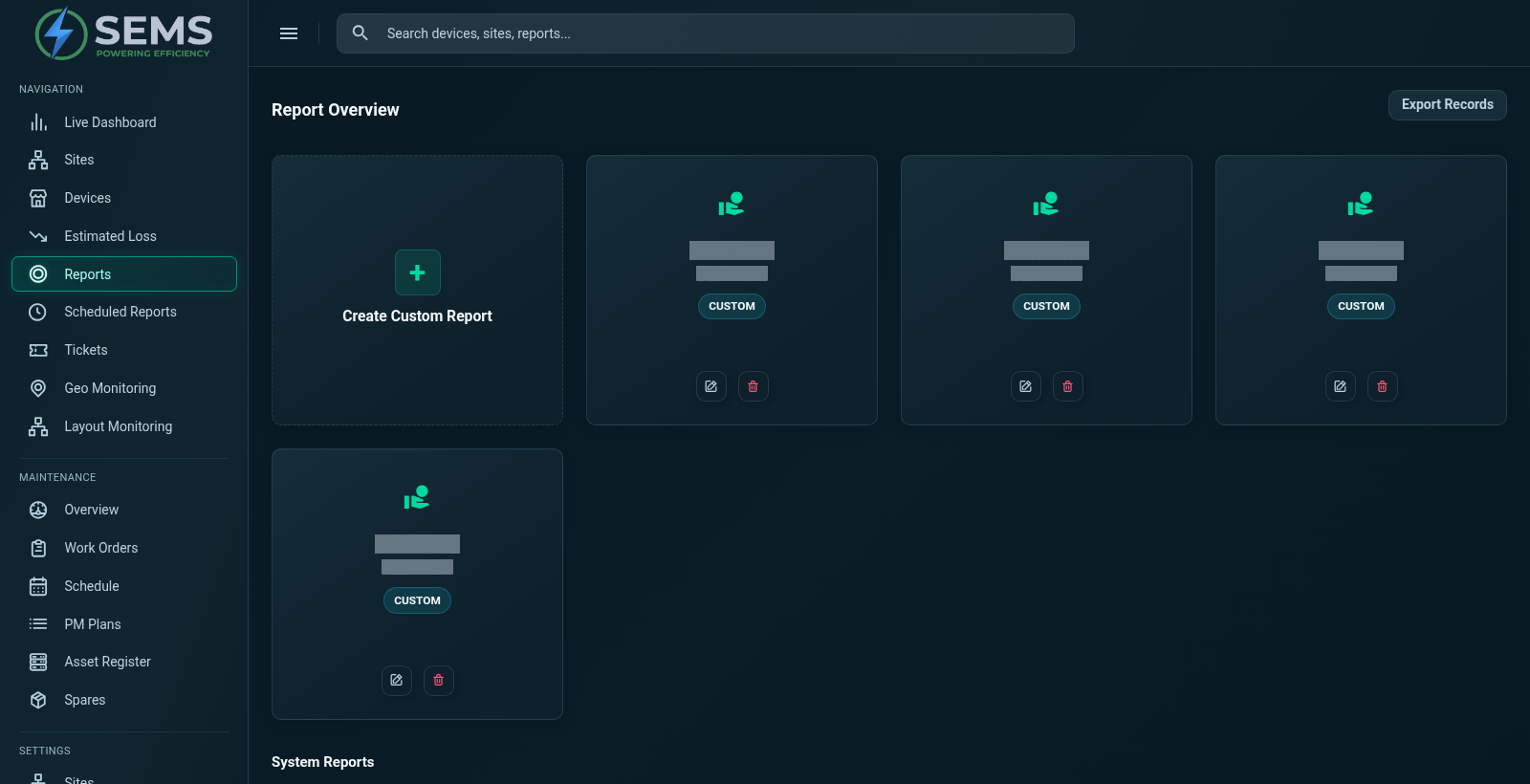
SEMS includes historical device curves, generation comparisons and a reporting interface with visible plant, yield and device report categories. These tools support operational review across sites and equipment. They do not remove the need to assess missing data or explain the operating conditions behind a comparison.
Begin with the decision the report should support
A daily operational review and a monthly management summary serve different purposes. The first may focus on data freshness, device availability and recent events. The second may ask how a period compares with another and which issues remain unresolved. Using the same collection of numbers for both audiences can hide the detail that each group needs.
Define the question before selecting the chart. If the objective is to investigate a generation interruption, use a period that includes the event and check device context. If the objective is to compare sites, establish comparable measurement boundaries and operating periods first. This keeps the report connected to a decision rather than turning it into a catalogue of available measurements.
Interpret generation reports carefully
Generation reporting brings together energy production over a defined interval. Daily totals can support routine review, while monthly and yearly views can reveal changes over a longer period. A report should identify the source of the measurement, the units and whether the interval is complete.
Avoid comparing a partial current period with a completed historical one without saying so. A lower total can reflect fewer reporting hours, different operating conditions or missing measurements. The Solar Energy Monitoring solution explains why generation should be reviewed alongside equipment availability and site context. Raw energy alone is not a complete measure of plant performance.
Review consumption and electrical measurements at the right boundary
Consumption reporting is meaningful only when the measurement boundary is known. A grid meter, an inverter and an internal panel can each describe a different part of the electrical system. Some sites measure consumption directly; others may require an agreed calculation using several points. That distinction should remain visible in the reporting definition.
SEMS presents available electrical readings and meter-related views. During discovery, confirm which values can support the report you need and how they are interpreted. Do not assume a billing-grade calculation, tariff model or certified energy balance from a dashboard label. Energy Monitoring System provides a practical explanation of meter context and centralized measurement review.
Use daily, weekly, monthly and yearly curves
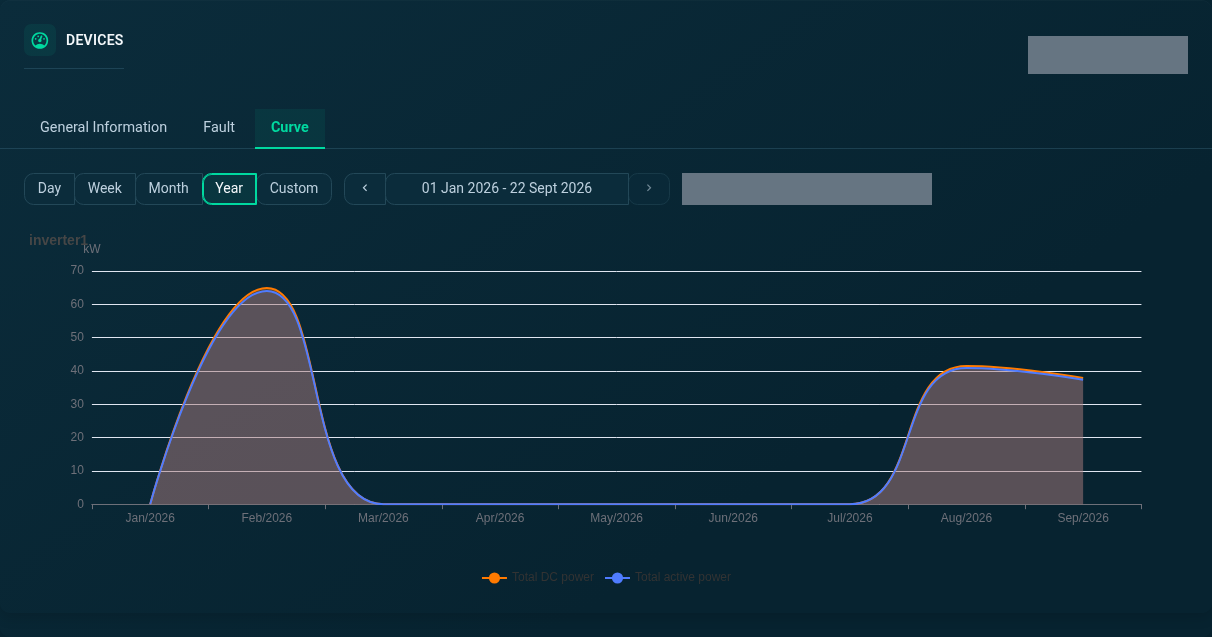
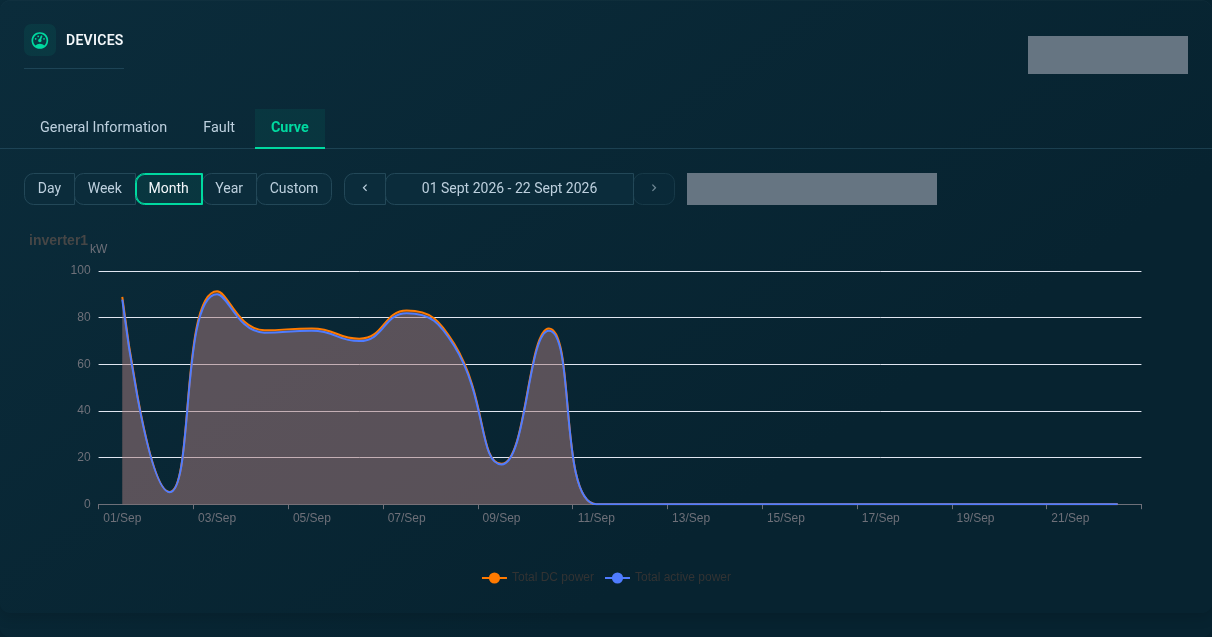
The inspected device curve interface offers Day, Week, Month, Year and Custom controls. These allow a reviewer to change the time perspective while staying with the selected device. Short intervals can help locate interruptions or changes in a profile; longer intervals can make repeated behavior easier to see.
The selected range should match the question. A monthly view may be useful for a broad pattern but insufficient to investigate a short event. A day view may reveal detail while concealing whether it repeats. Move between the two deliberately, and check that the underlying data exists. An empty chart is information about availability, not evidence that nothing happened at the installation.
Compare equipment and sites without hiding differences
Comparisons are useful when their assumptions are explicit. Two devices may have different capacities, configurations or operating conditions. Two sites may use different measurement boundaries or have different reporting coverage. These differences can matter more than the visual distance between two lines on a chart.
A good review records the comparison period, the relevant equipment differences and any known interruptions. It then identifies the observations that deserve further investigation. SEMS includes inverter generation comparisons and site overviews that support this process. For a portfolio workflow, see Multi-Site Energy Monitoring, which describes the move from a broad view into local evidence.
Connect performance reporting with events and actions
A useful performance report explains what the measurements suggest and what the team did next. Include relevant alarm context, communication gaps and operating events when they help explain the period. Separate a measured observation from an interpretation and from a proposed action.
For example, a generation gap may be documented alongside device availability and an alarm record. The report can state that these occurred during the same interval, then describe the checks needed to establish the cause. This is more defensible than assigning a reason from the chart alone. Performance Management develops this approach to reviewing indicators and tracking operational questions over time.
Agree on report availability and sharing requirements
The existence of a reporting interface does not establish every possible output format. Before relying on a report for a recurring business process, confirm the required fields, date ranges, permissions and delivery method. Ask to see the actual report in a demonstration using suitable non-sensitive data.
The public SEMS screenshots show report categories and real application views. Specific file exports, scheduled delivery and external reporting connections are not promised here. If your team needs a particular download or automated workflow, include it in the requirements for review. This keeps the website's description aligned with the product rather than treating an assumed feature as a commitment.
Build a repeatable review routine
Choose a small number of questions that are revisited consistently. Record the period, source coverage and any exceptions. Give the report a clear owner and make it easy for the next reviewer to understand why an issue was selected for attention. Over time, this produces a more useful operational record than a series of disconnected screenshots.
SEMS is a product of Sybel Micro Solutions for solar and energy monitoring. Request an analytics demonstration with examples of the reports you need, or explore the platform tour to see the generation, device and reporting views. The review should establish what is available now and which project-specific requirements need further assessment.
Frequently asked questions
What is energy analytics?
It is the structured examination of energy measurements to understand patterns, compare suitable periods and identify questions for operational investigation.
Which report categories are visible in SEMS?
The inspected reporting interface includes plant, yield and device categories. Confirm the specific report contents and permissions needed for your use case during a demo.
Can historical data be analyzed?
SEMS includes historical device curves and generation views. The available periods and detail depend on collected data and the agreed retention arrangement.
Are spreadsheet or PDF exports supported?
A specific format is not claimed here. Demonstrate the required export and report workflow before including it in a production reporting process.
Does a chart prove why output changed?
No. A chart shows measured patterns. Establishing a cause requires checking source quality, operating conditions and related equipment or event information.
Clear operational context
Actionable performance trends
Real SEMS application screens. Private information has been masked; readings reflect the capture time.
SEMS PLATFORM · 01
Analytics & Reports
Access plant, yield and device report categories from the report overview. Existing custom reports appear alongside the system report options.
SEMS PLATFORM · 02
Device Curve · Month
Explore the month view of the selected inverter’s power curve.
SEMS PLATFORM · 03
Device Curve · Year
Explore the year view of the selected inverter’s power curve.