Multi-Site Energy Monitoring
Multi-site energy monitoring organizes information from several installations in a shared interface. It helps a central team see which sites need attention and then move into the local measurements that explain the situation. The objective is a consistent review process across the monitored portfolio, while preserving the differences that matter at each site.
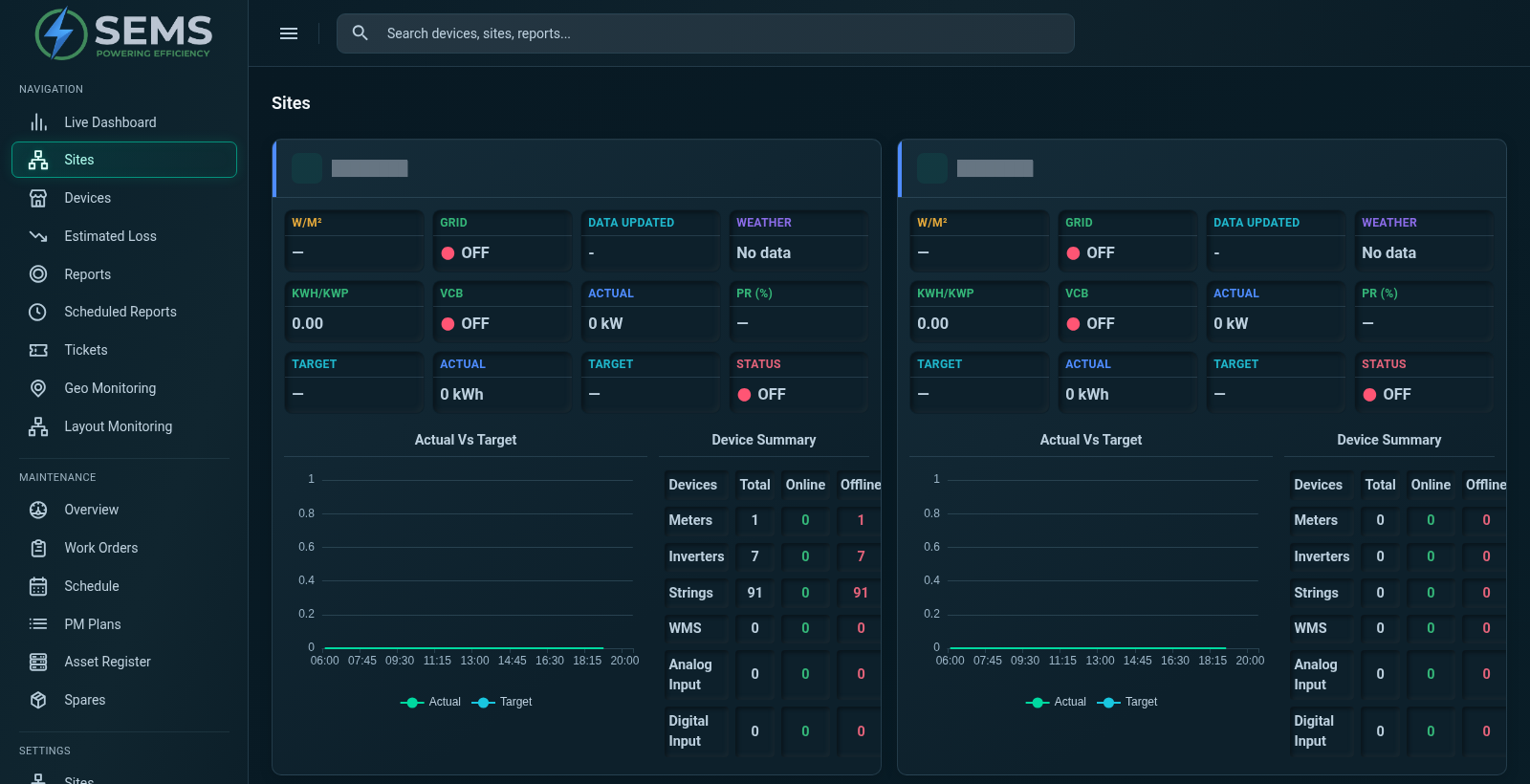
SEMS includes a site overview and individual site dashboards, with routes into devices, generation, electrical panels, alarms and historical curves. These screens allow a reviewer to change perspective from the portfolio to the selected installation. That transition is essential: an aggregate value can summarize activity, but it cannot answer every question about a local condition.
What is multi-site monitoring?
Multi-site monitoring brings the available data from multiple locations into one operational framework. Sites remain identifiable, with their own equipment and measurement context, while shared views help people organize their review. This is useful for solar portfolios, industrial groups, commercial facilities and other distributed assets that need consistent oversight.
Centralization does not mean every installation becomes identical. Collection arrangements, equipment types and reporting coverage can differ. A good implementation makes those differences visible and establishes a common language for the measurements that can be compared. Before building a portfolio view, agree on which site indicators have the same meaning and which require local interpretation.
Begin with coverage and freshness
A portfolio total is only as useful as the information contributing to it. If one site has stopped reporting, the overall number may not represent the full monitored scope. Review data availability before treating a total or comparison as complete. Establish how operators will recognize missing, delayed or partially collected information.
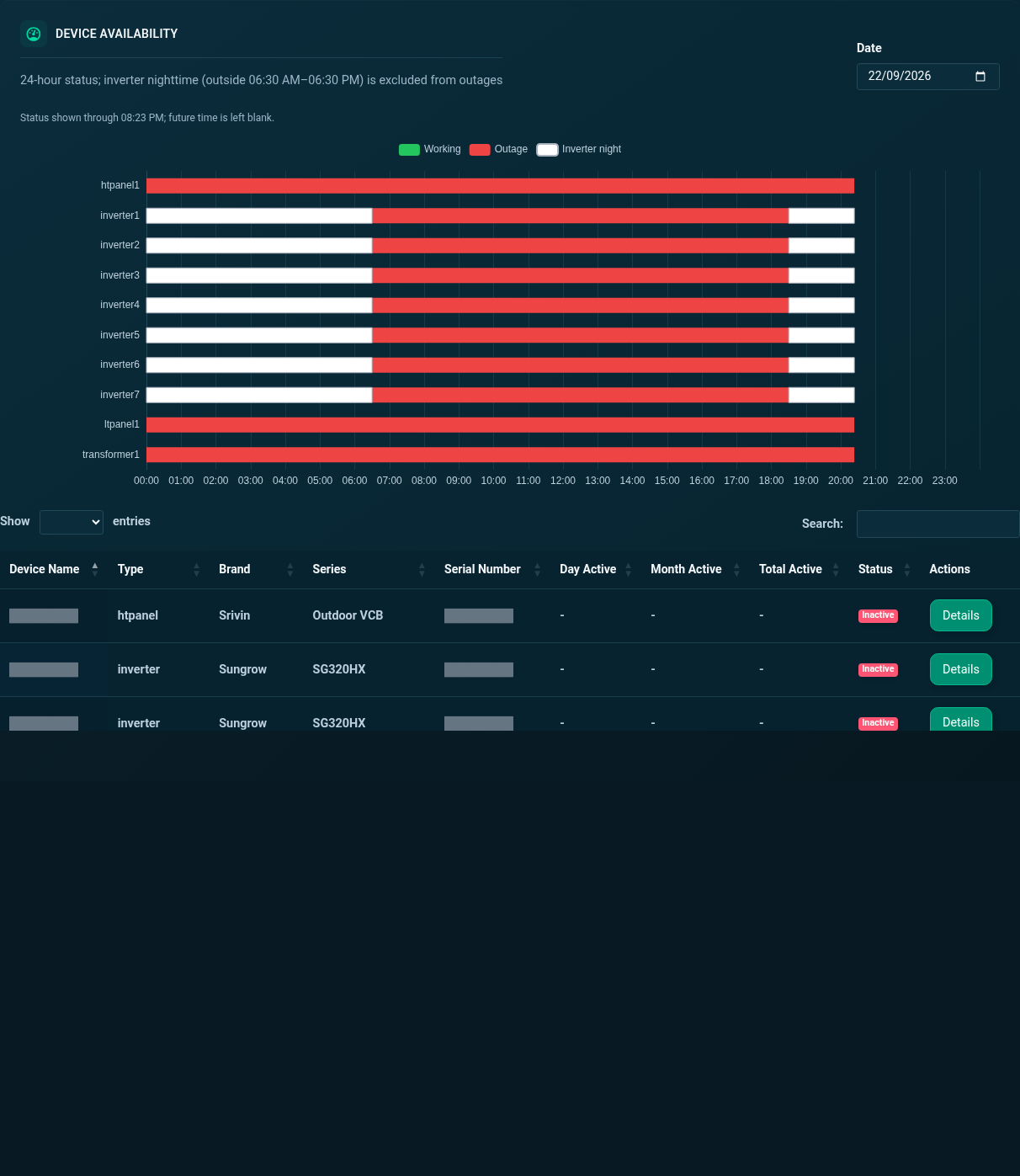
The SEMS site overview gives a starting point for reviewing sites, while device and availability views support a closer investigation. A central reviewer can use these screens to identify where information is current and where more checking is needed. The real-time monitoring workflow explains why timestamps and communication state belong beside the readings in an operational review.
Move from a portfolio question to local evidence
A central team may notice a site that deserves attention without yet knowing why. The next step is to open that site and inspect the relevant generation, device or alarm information. A useful drill-down preserves the context of the original question instead of forcing the operator to start again in an unrelated system.
SEMS provides this path through site dashboards and equipment tabs. For a solar site, inverter generation comparisons may be relevant. For an electrical measurement question, panel values or meter profiles may be a better starting point. The platform walkthrough shows these actual views so that teams can discuss their intended review process using a concrete interface.
Compare sites on an appropriate basis
A comparison should begin with a clear statement of what is being compared. Total energy, current power, reporting availability and a performance indicator each answer different questions. Raw output can differ because of site scale, configuration, operating conditions or the length of the reporting period.
Do not treat the largest production total as automatic proof of the best performance. Select comparable periods, document missing information and account for relevant site differences. If a normalized indicator is needed, agree on its definition and confirm the supporting data. The Performance Management page explains how to separate an indicator from the interpretation that follows it.
Use aggregated indicators without losing detail
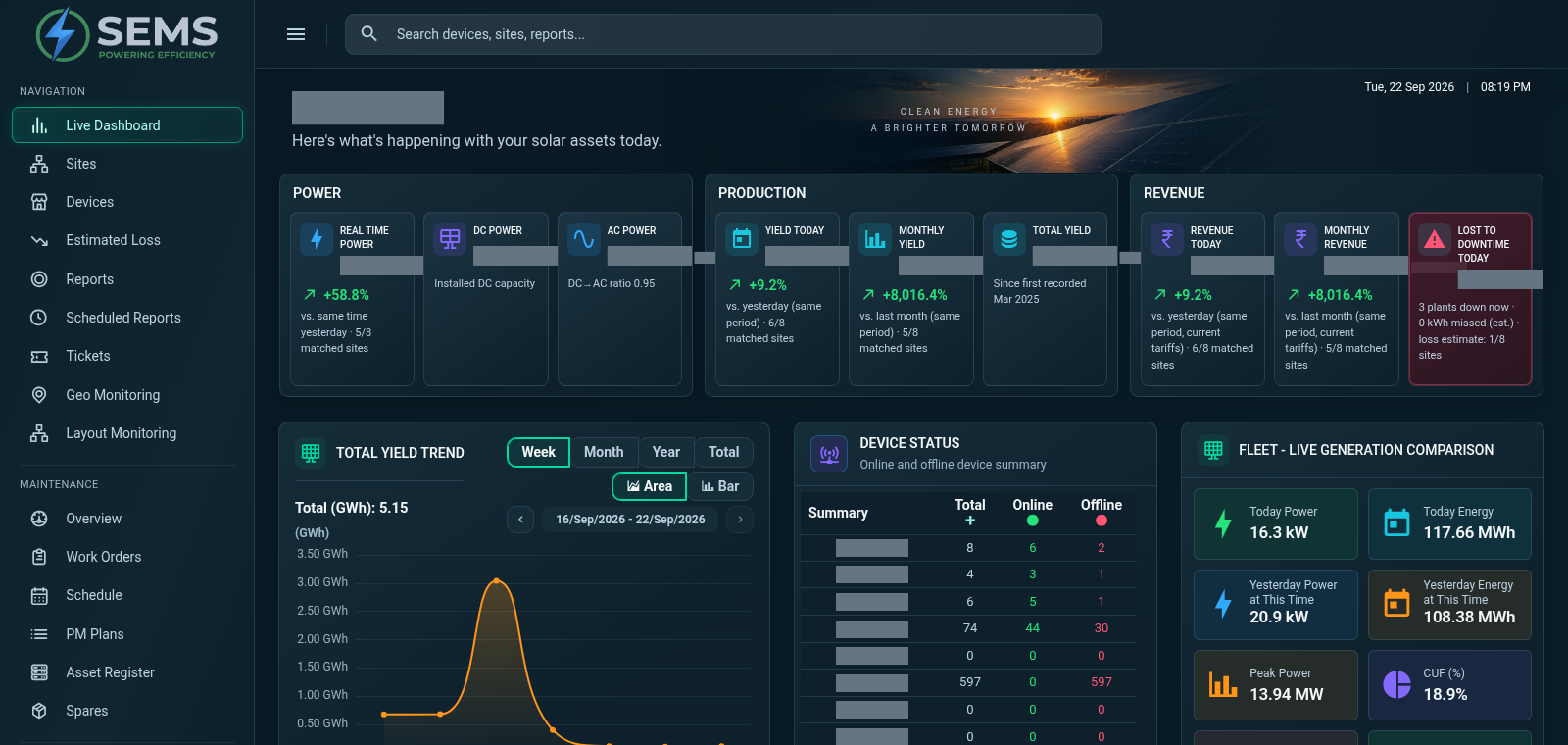
A summary helps people understand the monitored portfolio quickly, particularly during a routine review. The inspected SEMS dashboard includes fleet-level generation indicators and trends, alongside site information. These provide a broad view, while individual dashboards retain the detail needed for investigation.
When presenting an aggregate, explain its scope and collection period. Identify which sites are included and whether the underlying data is complete. A summary should lead naturally to the sites contributing to an unexpected result. This is especially important when reporting to people who do not use the monitoring interface every day and may not know its collection assumptions.
Coordinate central and local operations
Central oversight and local knowledge work best together. A portfolio reviewer can identify a specific observation and pass it to the person who understands the installation. The local team can then add context about operations, recent work or conditions that are not visible in the measurements.
Use clear references to the site, device and interval when sharing an issue. Record which checks have already been performed and what information is still missing. Alarm and ticket views can support the review, but the organization must define its ownership and response arrangements. Alerts and Alarms discusses this distinction between an event record and a completed operational response.
Practical portfolio use cases
A solar portfolio team may begin its day by checking reporting sites, then investigate generation differences at selected plants. An industrial group may use site information to organize discussions with facility teams. Commercial operators may focus on the consistency of meter reporting before preparing a periodic review.
In each case, the goal is to reduce ambiguity in how information is gathered and discussed. The system should help people find the relevant evidence, not encourage comparison of unrelated values. Start with a small set of common questions, then add site-specific views where they support a practical decision. A wider portfolio does not remove the need for careful local data mapping.
Plan the rollout and review process
Prepare a site inventory with the available equipment, collection arrangements and intended users. Identify the information that is common across sites and the information that is unique to particular installations. Agree on naming, units, time zones and reporting periods so that portfolio users can interpret the views consistently.
Also discuss access requirements and the process for adding a site to the monitored scope. Specific role arrangements, scaling limits and deployment architecture should be assessed rather than assumed. Request a multi-site demonstration and share your priorities. SEMS, developed by Sybel Micro Solutions, can then be evaluated against the operational questions your portfolio team needs to answer.
Frequently asked questions
Can SEMS monitor multiple sites?
The application includes site overview and individual site views. Confirm the site scope, data collection arrangements and access requirements for the intended deployment.
What is the benefit of a centralized view?
It gives a team a common place to organize review and identify sites needing attention, with a route into the local information needed for investigation.
Can site performance be compared?
SEMS presents site and generation information that can support comparisons. Use consistent periods and account for capacity, operating conditions and data coverage before interpreting differences.
Is it suitable for geographically distributed assets?
Distributed monitoring is a relevant use case. Practical suitability depends on connectivity, available telemetry and deployment requirements, which should be reviewed for each project.
Are portfolio totals enough for operational decisions?
No. Aggregates provide a summary. Important decisions often require site-level measurements, device context and confirmation from the people responsible for the installation.
Clear operational context
Actionable performance trends
Real SEMS application screens. Private information has been masked; readings reflect the capture time.
SEMS PLATFORM · 01
Site Overview
Compare site overview cards with equipment status, actual-versus-target charts and counts of connected device types.
SEMS PLATFORM · 02
Main Dashboard
Review power, production and site performance from a centralized dashboard. The site summary brings electrical readings, energy and yield indicators together.
SEMS PLATFORM · 03
Site Devices · Availability and List
Review device availability across the day, then browse the site’s equipment list and activity status.