Device and Inverter Monitoring
Device monitoring connects a site-level observation with the equipment information needed to investigate it. A generation total can show that something changed, but it may not reveal whether the change is shared across the installation or associated with a particular device. Device-level visibility gives the reviewer a more precise starting point.
SEMS includes device lists, availability views, live telemetry, general-information profiles, fault screens and historical curves. Its inverter views also show generation comparisons and string-related information. These are real application interfaces; the measurements available for a specific installation depend on the connected equipment and the agreed data mapping.
Understand what a device record represents
A device record should identify the source of the displayed information and explain the meaning of its measurements. A device name alone is not enough. Operators need to know where the equipment sits in the installation, which values it reports and whether those values are current.
During setup, agree on consistent naming and document the relationship between site, equipment and measurement points. Avoid labels that mean different things to different teams. The benefit of a device list is not simply the number of rows it contains; it is the ability to find the correct source quickly and interpret its information without repeatedly asking what a label means.
Review inverter status and generation
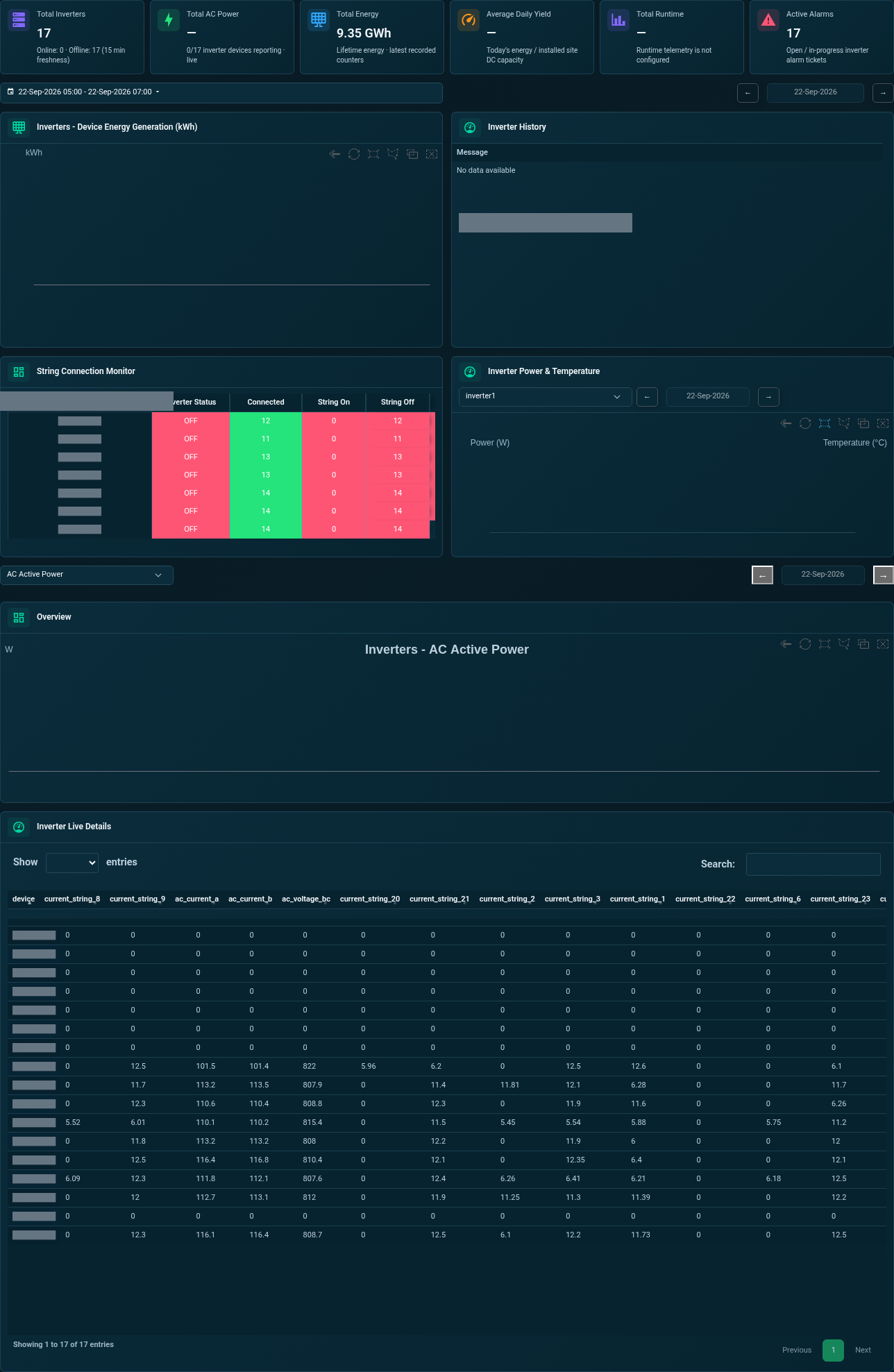
Inverters are important sources of solar generation and equipment information. The SEMS inverter dashboard includes comparisons of device generation, along with live readings and available power or temperature charts. These views can help a team identify devices that deserve closer investigation within the context of the wider plant.
A difference between inverters is an observation, not a diagnosis. Check whether the equipment is comparable, whether the reporting period is complete and whether configuration or operating conditions explain the difference. The Solar Energy Monitoring page describes how inverter information fits into a broader review of generation, availability and site performance.
Inspect strings and MPPT information where available
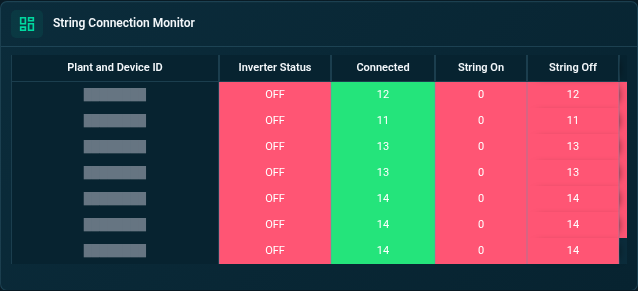
The inspected application includes a string connection monitor and a details view containing MPPT, string-current and installed-power information. A separate string connection screen shows connection-related detail. These can support a focused discussion of the measurements associated with an inverter rather than relying only on its total output.
The presence of a screen does not mean every connected device supplies every value. Confirm the actual points available from the equipment and how they map to the interface. Where a source has no recent readings, preserve that distinction instead of interpreting a blank or zero as a verified electrical condition. Detailed monitoring begins with confidence in the source and the meaning of the data.
Bring meter and electrical equipment readings into context
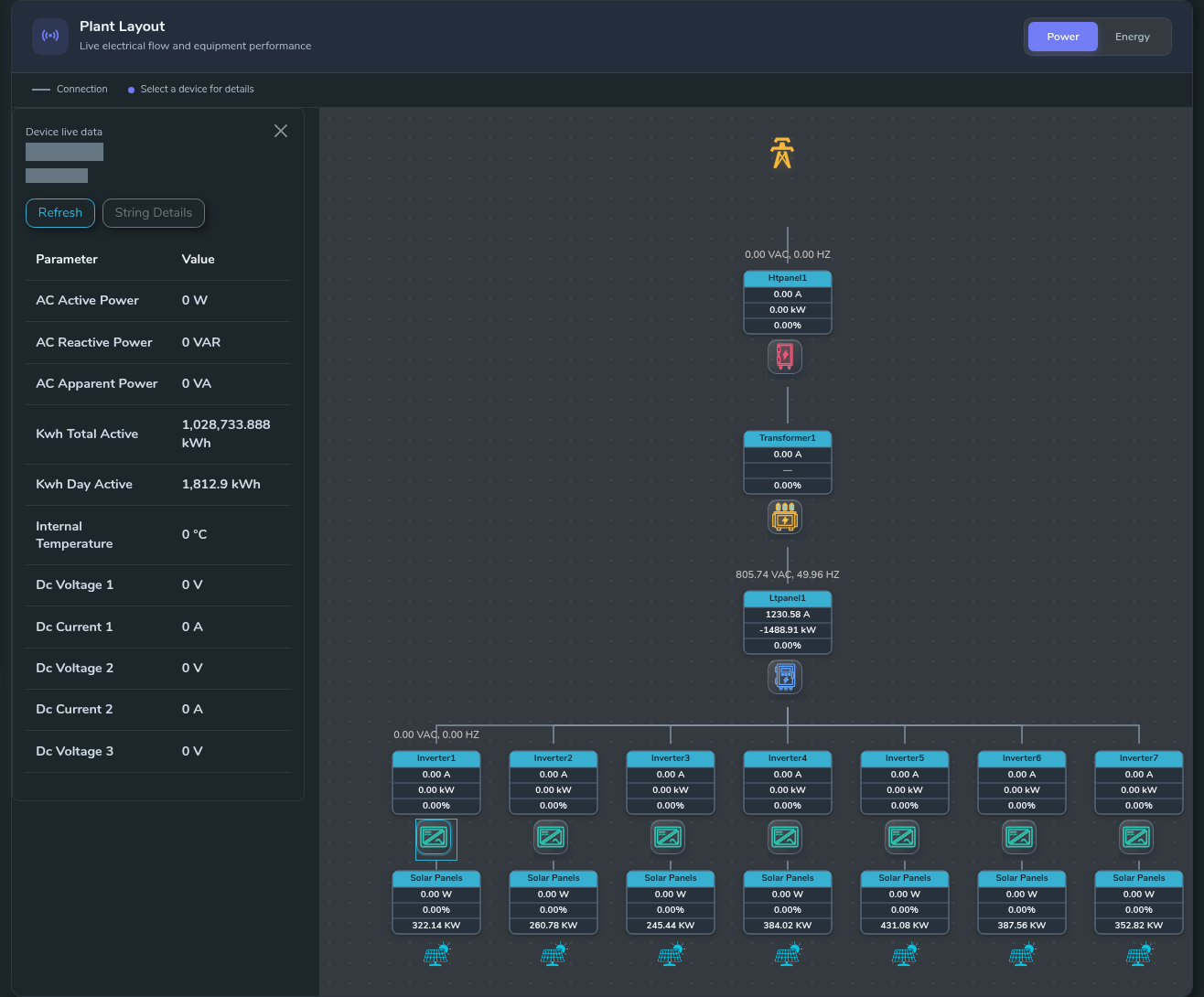
SEMS includes meter-oriented profiles and views for inspected LT-panel, HT-panel and transformer categories. Available screens present electrical values and, for the transformer view, named alarm conditions and temperature information. This helps connect a device to the relevant part of the site's electrical system.
Meters, sensors and communication equipment can play different roles in a monitoring project. A sensor's measurement, a meter's energy total and a gateway's reporting state should not be treated as interchangeable information. Share the proposed equipment inventory during discovery. No universal manufacturer list or protocol compatibility is claimed by this page; support must be established for the actual models and interfaces.
Check availability before interpreting telemetry
Device availability is a central part of monitoring quality. If a source stops reporting, the last value may remain visually plausible even though it is no longer current. Review the timestamp and availability context before concluding that equipment is steady, offline or producing no output.
The SEMS device availability view presents reporting history, and the device list provides a route into selected equipment. Operators can use these screens to distinguish a measurement question from a communication question. For the wider context of incoming readings, see Real-Time Energy Monitoring. The expected update interval should be documented for each relevant source or device category.
Use faults and curves together
Fault information and historical curves answer complementary questions. A fault view identifies the records available for the selected device. A curve shows how measurements changed over a chosen interval. Reviewing both can make an investigation more specific, especially when an operator needs to explain what happened before and after an observation.
The SEMS device interface includes General Information, Fault and Curve tabs, with several curve ranges. Some selected devices or periods may legitimately have no records. An empty fault list does not prove the absence of every possible equipment issue, and an empty curve does not prove that the installation was inactive. Interpret each view within its data scope.
Compare devices through a repeatable workflow
Choose the question, select the relevant device and establish the time period. Check freshness and units, then compare related measurements or comparable equipment. Record the observation and the checks required to explain it. This creates a clearer operational handover than a screenshot without a device or time reference.
A team might use this process to investigate an unusual generation profile, a repeated communication gap or a difference between electrical readings. The outcome is a better-defined question for the responsible operator or engineer. Monitoring supports that investigation; it does not automatically authorize changes, replace inspection or establish a root cause without supporting evidence.
Prepare an equipment-focused demonstration
Bring a list of device types and models, the measurements you currently receive, and the information your team wants to review. If a particular report, status or string measurement matters, identify it explicitly. This allows the demonstration to establish what the source supplies and how the relevant SEMS view presents it.
Explore the device screenshots to see the actual interface, then request a device monitoring demo. Sybel Micro Solutions provides SEMS as a solar and energy monitoring platform. The final equipment scope should be agreed through technical review rather than inferred from generic category names on a marketing page.
Frequently asked questions
What is device-level monitoring?
It is the review of measurements, status and available event information associated with an individual equipment source, rather than only a site-wide summary.
Can SEMS show inverter data?
The inspected interface includes inverter generation comparisons, live readings, string-related screens and historical curves. Available measurements depend on the connected inverter and mapping.
Which manufacturers are supported?
This page does not claim a universal compatibility list. Provide the actual device models and interfaces so that support can be assessed for the intended project.
Are sensors and communication devices the same as meters?
No. They can serve different collection and reporting roles. The monitoring design should identify what each source measures or communicates and how its state is interpreted.
Does a normal status prove equipment health?
A displayed status reflects the available information and its definition. Check data freshness, supporting measurements and the appropriate operational procedures before drawing wider conclusions.
Clear operational context
Actionable performance trends
Real SEMS application screens. Private information has been masked; readings reflect the capture time.
SEMS PLATFORM · 01
Site Dashboard · Inverters
Explore generation comparisons, connected strings, temperature charts and live inverter readings from one tab.
SEMS PLATFORM · 02
Inverter String Connection Monitor
Review connected strings and inverter status in the string connection monitor.
SEMS PLATFORM · 03
Device Profile · General Information
Inspect inverter electrical measurements, running status and MPPT voltage/current information in General Information.

SEMS PLATFORM · 04
Plant Layout · Device Live Data
Open a device’s live-data panel directly from its position in the plant layout.